Share
Archive, Website, & Marketing: The All-In-One Photography Workflow of Jock Fistick
Jock Fistick is a freelance photographer based in Brussels, Belgium, and PhotoShelter is at the very heart of his operation. His complete archive i...
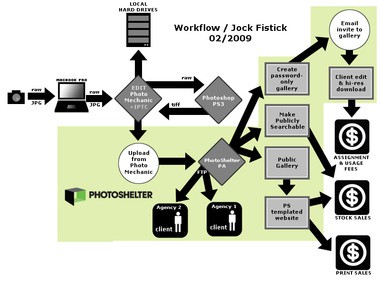
 Jock Fistick is a freelance photographer based in Brussels, Belgium, and PhotoShelter is at the very heart of his operation. His complete archive is safely stored within his PhotoShelter account — but he also makes use of the PhotoShelter website templates and runs his entire website through it.
Getting images to clients is also no problem because he’s using his website for that, too. He is primarily an editorial photographer, always looking for the next assignment. His website is a very big part of his marketing efforts to attract new clients and new assignments, so it must be search-engine savvy.
He is also a photographer who knows that his archive has value as a stock library (specializing in the European Union), and has even sold prints all throughout his website, powered by — you guessed it — PhotoShelter.
So how does a one-man operation do so much? His workflow is killing three birds with one stone.
Jock’s workflow begins with Photo Mechanic running on a Macbook Pro. He shoots all raw images (using his Nikon D3) and will convert them to JPG using Photoshop PS3. He uses the built-in uploader in Photo Mechanic to upload to his PhotoShelter archive.
If he’s on an assignment for one of his agencies, once images are uploaded to his archive, he will make use of the PhotoShelter FTP export tool to get his images delivered to them quickly. There’s really no sense in uploading to a client’s FTP server from his home connection, and then duplicating that upload to make an off-site backup.
One upload to PhotoShelter and he’s able to use OUR bandwidth (not his) to get his images delivered – and his archiving work is already done.
If he is on assignment for one of his corporate clients, he will create a password-protected gallery with high-resolution download access where his client can come, edit the entire take, and download the images they want — all without bothering him whatsoever. (And he gets a complete record of all the download activity.) The useful thing about the password-protected galleries — clients don’t need to register, or have a login, or anything like that. They simply need to know a simple word – which Jock assigns to the gallery, and emails the client as part of the invitation. Simple for his client means simple for him.
Since his website is so intimately tied into his workflow, he is able to update his website easily and often. This is great for stock image and print sales – both of which are handled simultaneously.
Jock has three different revenue streams coming out of his single archive. For a freelance photographer who travels through Europe, it means he won’t miss any opportunity simply because he’s on the road, doing what he does best — shooting.
Take a look at Jock’s website. It’s 100% PhotoShelter!
Next Post: Jensen Larson’s Wedding Photography Workflow
Previous Post: Brad Mangin’s Editorial Photography Workflow
You May Also Like
-
Expert Advice and Top Tips from Pro Photographers for 2024
What’s one piece of advice you would give to aspiring or up-and-coming photographers? We asked nine experienced photographers and PhotoShelter members to share their top tips for those looking to get ahead in their photography careers. From finding your own visual voice to working with a mentor or photo assistant, each piece of advice listed […]
-
What’s On Your Photography Holiday Wish List?
The holiday season is around the corner and that means it’s the perfect opportunity to upgrade your gear or find that special gift for the visual storyteller or photography enthusiast in your life. We reached out to a handful of renowned photographers and PhotoShelter members, each with their unique styles and preferences, to bring you […]
-
Share a Photo That Means the World to You
We all have a photo that means the world to us. Maybe it’s one we made ourselves – the first photo from our first camera. It could be an old family photo in a beloved photo album. Or maybe it’s an iconic image that hangs on our wall at home. With World Photography Day coming […]