Share
Anatomy of the Ideal Google+ Profile
Sooner or later, Google is probably going to suck us all into its social network, Google+. That’s hardly breaking news at this point. Especially ...
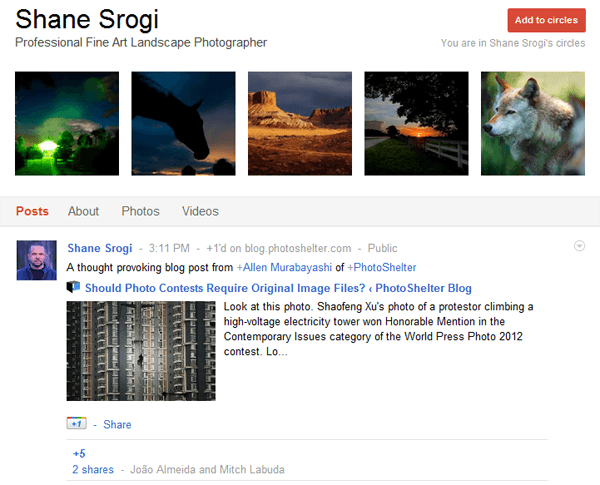
Sooner or later, Google is probably going to suck us all into its social network, Google+. That’s hardly breaking news at this point. Especially if you follow SEO trends, it’s pretty clear that Google puts a lot weight on ranking on its own products (read why here: “How Google Gets Personal & Why You Need To Know About It“).
I’m going to skip the argument about whether you really need another social media account or how it can benefit your photography business, because the bottom line is this: we know from the analytics that social media drives traffic to photography websites (the aggregate of PhotoShelter websites sees about 23% of their total referral traffic from social media). More visitors to your website ultimately means the potential for more business. The end.
It’s your choice what social media sites to use. We know that Google+ is starting to have a significant impact on SEO. So what I want to discuss is if (and when) you set up your Google+ profile, how do you know if you’re making the most of it? I talked to the social media-obsessed nature and travel photographer Shane Srogi, who is followed by 26,616 people, and growing. Shane was one of the first photographers that we noticed was really taking Google+ by the reins. Now he regularly posts updates to Google+, engages with the photographer community, and gets upwards of 40 +1’s on his photos.
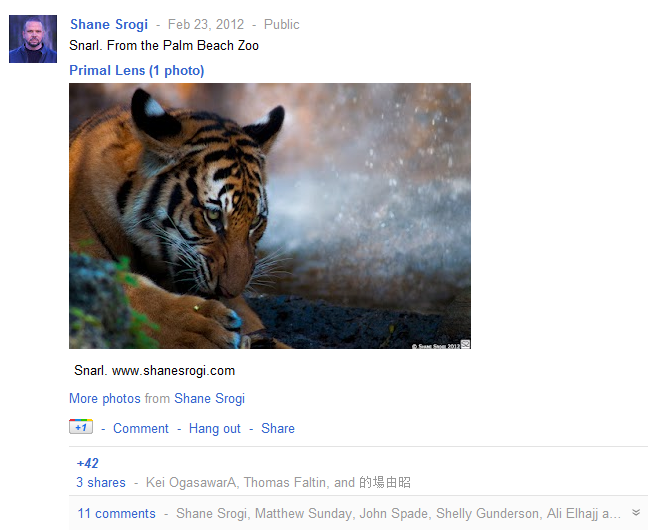
So what’s the secret to building a profile that’s appealing to both humans and search engines? A big part of it is in the initial set up of your About page. There’s potential to add a lot of detail about yourself, and it can seem overwhelming. But for our purposes, the major components are:
- Introduction
- Bragging rights
- Occupation
- Employment
- External links: Other profiles, Contributor to, and Recommended links
Here’s a snapshot of Shane’s About page:
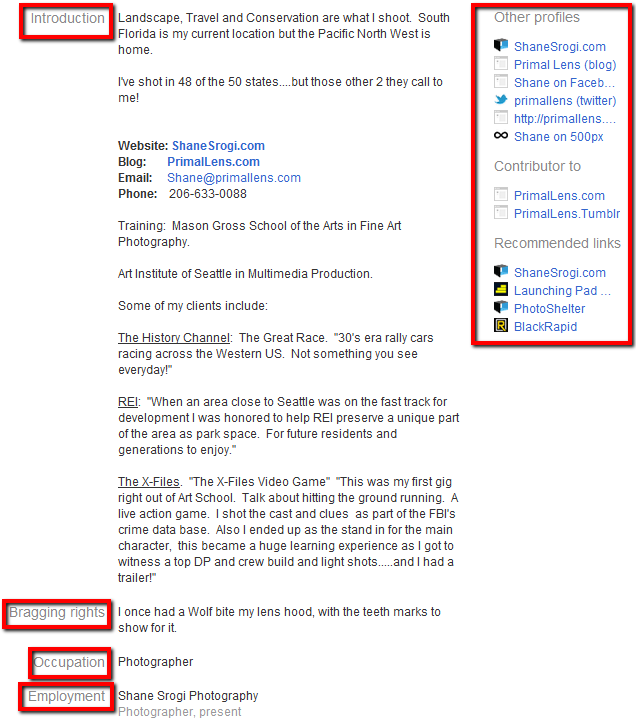
“The introduction is important, first impressions and all,” advises Shane. “Starting a new network is like starting a new school. I listed what I shoot, where I’m currently located, and links to where you can contact me. Some of these things may be repeated elsewhere in my profile, but this way someone who is skimming my intro can find pertinent information quickly.”
While that’s all good stuff, let’s also not lose sight of how Google reads your profile – it’s a little different from the human eye. Here’s a rough translation of how the search engine views your profile’s content:
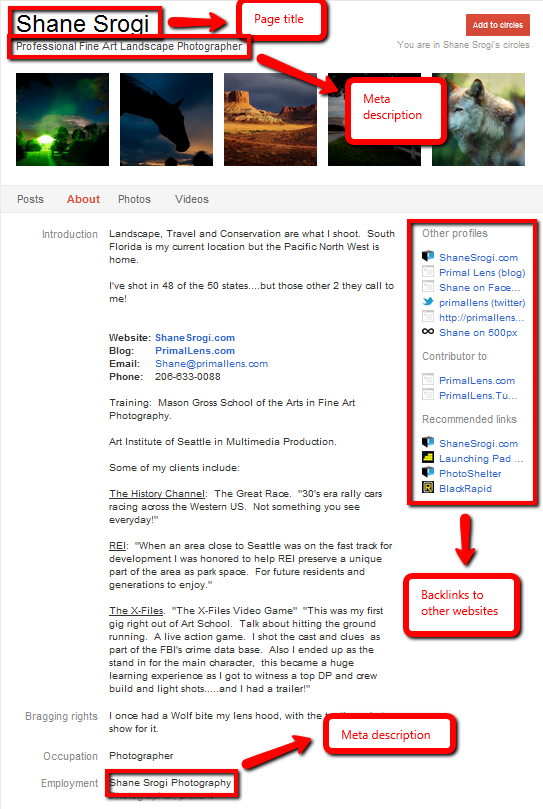
When you Google “Shane Srogi”, you can see that these components are being picked up:

It’s crucial to build out your Google+ profile not just to engage the Google+ community, but for Google’s algorithm as well. Treat it like a mini-website with a page title and meta description, both of which are important for building SEO and getting indexed by Google. Keep your keywords consistent across all platforms by using the same list on your Google+ as on your website. As Shane says, “I used the tagline [the description under your name] to specifically describe what I shoot. I found that ‘Photographer’ was far too vague.” “Professional fine art landscape photographer” is much, much better.
Also pay attention to your links. Since Google places weight on its social network, this is an ideal opportunity to build a backlink to your website. Shane also suggests using it to cross-promote your other social media sites like Facebook and Twitter.
Your first objective for building SEO with your Google+ profile should be just to rank for your name. Shane’s G+ profile is #3 result when you Google “Shane Srogi”. This seems obvious, but as you begin to build social klout, you might start to show up in personalized search results for your specific keywords. Shane is already appearing for the search, “West Palm Beach nature photographer” – and that’s where you SEO efforts really start to pay off.
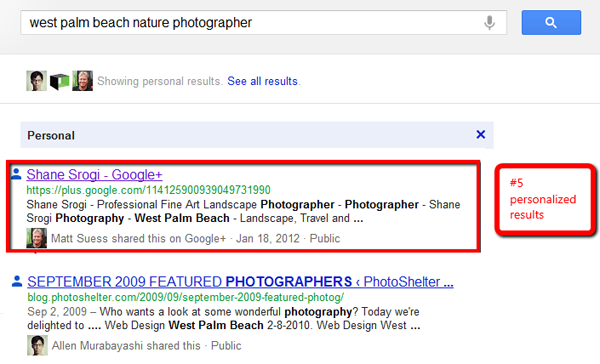
Once you’ve built out your profile, what’s next? “Upload between 10-20 of your best photos,” says Shane. “You want to upload a solid portfolio for people to look through and enjoy,” he says. Then engage with the community! Photographers have really taken a liking to Google+, so there’s no shortage of conversation.
“When you see an interesting image, make a comment,” says Shane. “Mingle. Carry on conversations. People will add you to their Cirlces before you know it.”
You can connect with Shane Srogi on his Google+ page, as well as PhotoShelter on Google+. And for more information on how to take advantage of Google+, Facebook, Twitter, and the other major social media platforms, download our free guide: The Photographer’s Social Media Handbook.
You May Also Like
-
Expert Advice and Top Tips from Pro Photographers for 2024
What’s one piece of advice you would give to aspiring or up-and-coming photographers? We asked nine experienced photographers and PhotoShelter members to share their top tips for those looking to get ahead in their photography careers. From finding your own visual voice to working with a mentor or photo assistant, each piece of advice listed […]
-

What’s On Your Photography Holiday Wish List?
The holiday season is around the corner and that means it’s the perfect opportunity to upgrade your gear or find that special gift for the visual storyteller or photography enthusiast in your life. We reached out to a handful of renowned photographers and PhotoShelter members, each with their unique styles and preferences, to bring you […]
-
Share a Photo That Means the World to You
We all have a photo that means the world to us. Maybe it’s one we made ourselves – the first photo from our first camera. It could be an old family photo in a beloved photo album. Or maybe it’s an iconic image that hangs on our wall at home. With World Photography Day coming […]