• Home
  • Tour
  • Examples
  • Plans & Pricing
  • Free Guides
  • Blog
  • Become a Member
  • |
  • Help
  • Sign In
Create an account

  • Blog Home
  • The Business of Photography
    • Sales & Pricing
    • Marketing
    • Getting Hired
  • Photography Websites
    • Tips & Tools
    • SEO & Analytics
    • Workflow
  • Inspiration
    • Shout-Outs
    • Featured Photos
    • Luminance Videos
  • Industry News
    • PhotoShelter News
    • Community News
Home » Featured Posts » A Brand New PhotoShelter: New Features & Big Workflow Changes
A Brand New PhotoShelter: New Features & Big Workflow Changes

Posted by: Lauren Margolis    Date: April 5, 2012  |  4 Comments
Tweet

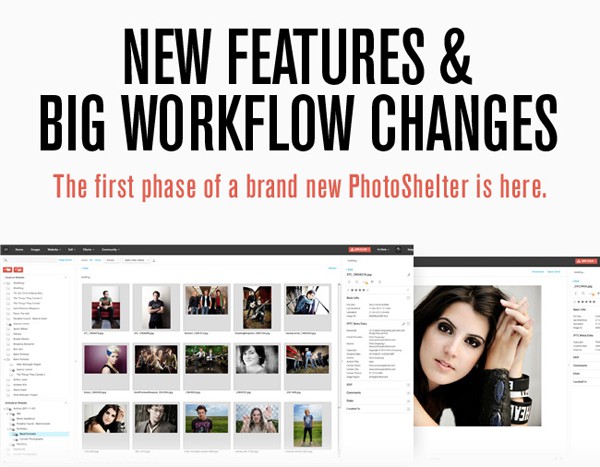
We’ve just introduced a new Image Browser and workflow tools that fundamentally change how you organize and present your images. The first phase of a brand new PhotoShelter is exciting, but you’ll need some help finding your way around. To see the new features and prevent interruptions to your workflow, review this overview of the new system first.

We’ll be adding more features soon and fixing known bugs in the coming days. Until then, enjoy the new features and stay tuned for more info on the next phases of a brand new PhotoShelter – it’s going to be a very exciting year! 

The big changes include the following:

Easier, faster image management

We combined the Archive and Gallery areas into a single user interface. Now, virtually everything you want to do with an image inside of PhotoShelter is possible in one place: the new Image Browser. You can easily navigate between Unlisted content and content that’s Listed on your website.

Resources:

  • Tutorial: Navigating The Photographer’s Area
  • Tutorial: The Image Browser
  • Video: Understanding What Happened with Your Archive
  • Video: Image Browser
  • Video: Uploading Images to PhotoShelter

Easier image organization

We added a more intuitive structure for arranging public and private image galleries, including infinite gallery “nesting,” and a simple way to see all the content listed on your website. For example, clicking Listed on Website will give you a view of how Galleries are arranged on your website in the center pane.

Resources:

  • Tutorial: How do I…create nested galleries?
  • Tutorial: How do I…change the order of how my galleries appear on my website?
  • Video: Adding a Cover Image to Your Galleries
  • Video: Adding, Deleting and Removing Galleries
  • Video: Reorganizing Your PhotoShelter Public Website

Better File Delivery

We created a new set of online image delivery tools to help you get batches of images to clients faster. This includes a brand new address book that speeds up the distribution of your content to groups and individuals, and a Quick Send feature for delivering instant image downloads to clients in a hurry.

Resources:

  • Tutorial: Common Photographer Workflows
  • Video: Quick Send

Powerful viewing and access permissions

We’ve created a new way to manage visitor permissions. This will empower you to easily manage access to sensitive content, allow restricted downloads without hiding content entirely from fans and search engines, and simplify how your busy clients interact with your images. Multiple permissions for the same Gallery enable you to avoid creating new Galleries for every scenario.

Resources:

  • Tutorial: Publishing, Visibility & Access
  • Video: Upload, Publish, and Share a Gallery

And much, much more

We’ve also added a host of new workflow tools, including an improved archive search, and HTML5 drag and drop uploading. These upgrades will save you time, make it easier to edit images and collaborate with clients, and keep them coming back for more.

Your Files Are Safe

We took extreme measures to ensure that none of your files were lost during the update. We converted your Archive into a hidden Collection and created duplicates of your Galleries to make certain that nothing was lost. Unwanted copies are easily removed. Here’s a short video on how to deal with them.

We’re here to help

The last week has been challenging, as many of you will agree. We recognize that all changes, even ones that pave the way for improvement, require big adjustments. It’s our responsibility to help you make the adjustment and ensure that the service is bug free. When we released last week, this was not the case, and so we’re provided every PhotoShelter member with a little more storage (a lot really) as one way we can apologize for any inconvenience or stress caused by the bugs from last week. (Check your total storage here.)

We’re here for you as we make the transition together and we’re very open to your feedback. The Help Area has been updated with new written and video tutorials and an introductory video by Allen “Feeling the Panes – Finding Your Way Around the New PhotoShelter“. Plus, we’re tracking the status of any known issues in this forum thread.

Our New York-based Client Services team is offering extended email support. Get help by emailing us anytime at support@photoshelter.com, or call us at 1-212-206-0808. Phone support is available from 9:00am – 6:00pm US EDT, Monday – Friday. We’re here to help!


4 Comments

Ervin Sarkisov 4-5-2012

Great job! Thanks for the upgrade. Best regards.

Werner Priller 4-6-2012

I really like the upgrade, much easier workflow, much better overview – awesome job! Thanks!

Paul 'Spike' Reddington 4-6-2012

Guys, much better than before – I never figured out why we needed an archive and a gallery. The confusion of where an image is has been removed and we simply upload it and decide whether to make it visible or not.

Looking forward to the rest of the upgrades – and thanks for the bonus storage!
Spike

Comment


Cancel  

  • Popular Posts

    • Find Your Images Online Using Reverse Image Search on Google

    • Video Demo: Retouching Portrait Photography Using a Photoshop Quick Action

    • 5 Ways Photographers Can Give Back

    • 14 Respected Photographers' Plans to Jumpstart Their Photography Business in 2013

    • Are Photography Contests Worthwhile or Worthless?

    • Six Standout Night Photography Tips to Help You Master the Craft

    • The 40+ Items Every Photography Assistant Needs Now

    • Rant: I Love Photography

    • 13 Digital Point-and-Shoot Cameras Used by the Pros

    • Pro Wedding Photo Ideas: 25 Creative Shots


Step up to a more powerful photography website!

Try PhotoShelter
  • PhotoShelter
    • Home
    • Tour
    • Examples
    • Plans & Pricing
    • Free Guides
    • Blog
  • About
    • Our Team
    • Affiliate Program
    • Press Room
    • Legal & Privacy
    • Free Webinars
    • Photographer Profiles
  • Contact
    • Help
    • Facebook
    • Twitter
    • Vimeo
    • Scribd

Contact us if you have a question!

T. (212) 206-0808 or send us a message

Our Client Services team is available to help you and answer your questions Monday through Friday from 9am - 6pm EST.


All photographs and illustrations that appear on the site are copyright of their respective owners.
©2005-2011 PhotoShelter, Inc.

PhotoShelter