Share
Microformats and SEO
There’s a lot of stuff on the web. How do you ever know if you’ve found what you’re looking for? For example: when you come upon a webpage th...

There’s a lot of stuff on the web. How do you ever know if you’ve found what you’re looking for?
For example: when you come upon a webpage that has a cooking recipe, how do you know it’s a recipe? Does it say the word recipe? Is there a list of ingredients with measurements? Are there descriptions of each step to take?
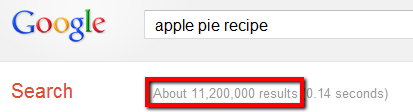
A search for “apple pie recipe” yields 11+ million results. Which is the right result for you?
It’s relatively easy for humans to parse through a webpage quickly and intuit the intent. The same cannot be said for search engines. Yes, they can find textual clues (i.e. the word “recipe”), but there’s always a bit of ambiguity on whether their algorithm picks up on the site’s overall intended purpose. And this ambiguity is significant because when you search for the phrase “apple pie recipe,” you’re probably looking for a recipe, and not a photo, book, t-shirt, or video. So how can you tell search engines that your website is truly about apple pie recipes, or photography, or whatever?
Most of the content on the web is actually unstructured, which means that there’s no meta data explicitly describing what it is, and thus helping search algorithms understand what your website is about is kind of difficult. To help fix this technical miscommunication, Google and Yahoo! got together and created what they call “microformats“. Microformats are web-based specifications that help describe structured web data. (If you’re heard of vCard – .vcf files – then you’re already familiar with the concept of microformats, albeit the microformat version is hCard.)
Bottom line: Microformats help remove ambiguity about the intent of your site’s content.
If you want to get really geeky about it, here’s what some HTML describing the text on a business card might look like without microformats:
<ul>
    <li>Joe Doe</li>
    <li>Jo</li>
    <li>The Example Company</li>
    <li>604-555-1234</li>
    <li><a href="http://example.com/">http://example.com/</a></li>
</ul>
And with microformats:
<ul class="vcard">
    <li class="fn">Joe Doe</li>
    <li class="nickname">Jo</li>
    <li class="org">The Example Company</li>
    <li class="tel">604-555-1234</li>
    <li><a class="url" href="http://example.com/">http://example.com/</a></li>
</ul>
This seemingly simple addition of naming “class” and other HTML make a world of difference to search engines, because now it’s unambiguous that the data being displayed on the page is business card information, and each specific field of data is defined.
Turns out there is a microformat for images too. You already know about the HTML image attribute “ALT” which defines “alternate text” for an image (and if you don’t, then it’s time to check out the SEO For Photographers Bootcamp). But the ALT attribute isn’t as explicit as having a microformat field called “caption.” And if you were going to try to optimize your images for search, it makes sense to use the microformat spec that was created by the major search engines. If you have a PhotoShelter site, then we fill the following fields for you automatically:
- Filename
- URL
- Keywords
- Caption
- Author
- Size
- Date Created
Google has stated that microformats don’t directly affect SEO, but they’ve also implied that removing ambiguity about the meaning of certain content could improve the propensity of search engines to find, index and rank content. What have we found? A 400% increase in indexed images after we introduced microformats into PhotoShelter websites.
If you don’t have a PhotoShelter website, then you can use Google Webmaster’s Rich Snippets Testing Tool to determine whether your website is using the Image microformat or not.
Here’s an image that does:

Photo by Marc Yun
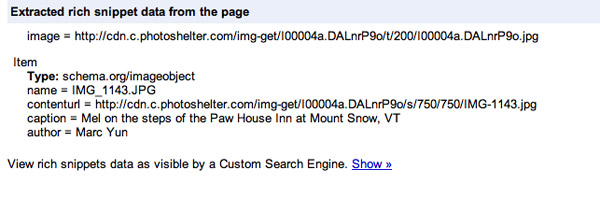
Using the microformat explicitly identifies specific data on this page.
And one that doesn’t:

Source: www.thelivewellcompany.com

Images without microformats don’t have explicit mark-up to allow search engines to “understand” content.
Takeaway
If you’re not up to speed with on-page SEO factors like page titles, h1 tags, ALT attributes, etc., then don’t stress about conquering microformats. But if you’re more advanced and familiar with HTML, it’s worth looking into so that you touch on the various components that positively (or negatively) affect your website’s SEO.
Want more strategies and insights to improve your website’s search engine rankings? Sign up and get the free 39-page SEO for Photographers Workbook, plus more tips sent right to your inbox with our 4-week Bootcamp.

You May Also Like
-

Expert Advice and Top Tips from Pro Photographers for 2024
What’s one piece of advice you would give to aspiring or up-and-coming photographers? We asked nine experienced photographers and PhotoShelter members to share their top tips for those looking to get ahead in their photography careers. From finding your own visual voice to working with a mentor or photo assistant, each piece of advice listed […]
-

What’s On Your Photography Holiday Wish List?
The holiday season is around the corner and that means it’s the perfect opportunity to upgrade your gear or find that special gift for the visual storyteller or photography enthusiast in your life. We reached out to a handful of renowned photographers and PhotoShelter members, each with their unique styles and preferences, to bring you […]
-

Share a Photo That Means the World to You
We all have a photo that means the world to us. Maybe it’s one we made ourselves – the first photo from our first camera. It could be an old family photo in a beloved photo album. Or maybe it’s an iconic image that hangs on our wall at home. With World Photography Day coming […]